
MySQL for Beginners: A Practical Guide for Aspiring Tech Professionals (2026)
In today’s digital world, every website, app, or platform you interact with is powered by data. Whether you’re posting a blog, logging into a website, or leaving a comment, there’s a system working behind the scenes to store and manage that data.
That system is often MySQL.
If you’re stepping into tech, especially web development, understanding MySQL is not optional—it’s foundational. This guide will help you move from confusion to clarity with practical insights and real-world relevance.
What is MySQL?
MySQL is a powerful database management system that stores, organizes, and retrieves data efficiently.
Think of it as the brain of your website. While your website design is what users see, MySQL is what makes everything work behind the scenes.
Why MySQL Matters in Real Life
Every dynamic feature you use online depends on a database:
- Blog posts are stored and fetched
- User logins are verified
- Comments are saved and displayed
- Orders in e-commerce are processed
Without MySQL, websites would be static and lifeless.


MySQL in WordPress
If you run a WordPress blog:
- Posts → stored in
wp_posts - Comments → stored in
wp_comments - Users → stored in
wp_users
Every action you take in WordPress is powered by MySQL.
What Can You Do with MySQL?
Even as a beginner, you can:
- Remove spam comments permanently
- Bulk edit blog content
- Reset passwords
- Clean your database for better performance
This is where you move from “user” to “controller.”
Backend + MySQL: The Real Power
When combined with backend languages like:
- PHP (used in WordPress)
- Node.js (modern applications)
MySQL becomes part of a complete system:
User → Backend → MySQL → Response
This is how real applications are built.
Career Opportunities
Learning MySQL opens doors to:
- Web Development
- Backend Development
- Full Stack Development
- Database Administration
It’s one of the most practical and in-demand skills in tech.
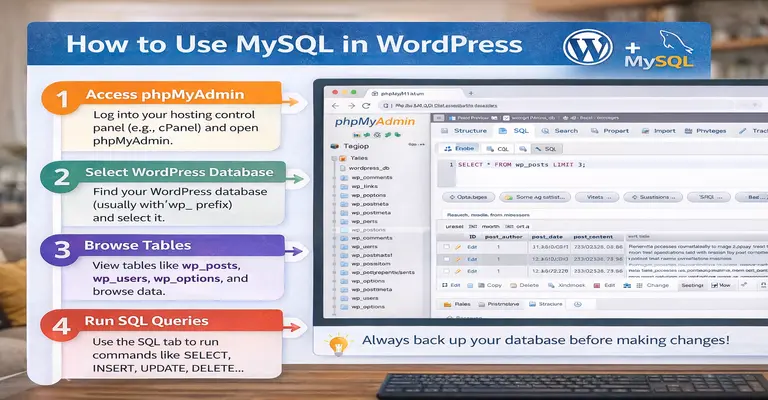
MySQL Practical Cheat Sheet for WordPress & Beginners (2026)
This guide includes the most useful real-world MySQL queries and backend connections you’ll actually need while working with WordPress or learning backend development.
1. Connect PHP to MySQL
$conn = new mysqli("localhost", "USERNAME", "PASSWORD", "DATABASE_NAME");

if ($conn->connect_error) {
    die("Connection failed: " . $conn->connect_error);
}
echo "Connected successfully!";
2. Basic SQL Queries (Core Commands)
Fetch Data
SELECT * FROM table_name;
Insert Data
INSERT INTO table_name (column1, column2)
VALUES ('value1', 'value2');
Update Data
UPDATE table_name
SET column1 = 'new_value'
WHERE id = 1;
Delete Data
DELETE FROM table_name
WHERE id = 1;
3. SQL Joins (Important)
INNER JOIN
SELECT users.name, comments.comment
FROM users
INNER JOIN comments
ON users.id = comments.user_id;
LEFT JOIN
SELECT users.name, comments.comment
FROM users
LEFT JOIN comments
ON users.id = comments.user_id;
4. Indexing (Performance)
Create Index
CREATE INDEX idx_name ON users(name);
Remove Index
DROP INDEX idx_name ON users;
5. WordPress Database Operations
View Posts
SELECT * FROM wp_posts LIMIT 5;
Update Post Title
UPDATE wp_posts
SET post_title = 'New Title'
WHERE ID = 10;
Delete Spam Comments
DELETE FROM wp_comments
WHERE comment_content LIKE '%spam%';
Delete Trash Posts
DELETE FROM wp_posts
WHERE post_status = 'trash';
6. Reset WordPress Password
UPDATE wp_users
SET user_pass = MD5('newpassword')
WHERE user_login = 'admin';
7. Replace URLs (Very Useful)
UPDATE wp_posts
SET post_content = REPLACE(post_content, 'old-url', 'new-url');
8. Fix Site URL (If Broken)
UPDATE wp_options
SET option_value = 'https://yourdomain.com'
WHERE option_name = 'siteurl';

UPDATE wp_options
SET option_value = 'https://yourdomain.com'
WHERE option_name = 'home';
9. Disable All Plugins (Emergency Fix)
UPDATE wp_options
SET option_value = 'a:0:{}'
WHERE option_name = 'active_plugins';
10. Secure Queries (Prevent SQL Injection)
Unsafe
$sql = "SELECT * FROM users WHERE username = '$input'";
Safe (Prepared Statement)
$stmt = $conn->prepare("SELECT * FROM users WHERE username=?");
$stmt->bind_param("s", $username);
$stmt->execute();
11. Node.js + MySQL Connection
const mysql = require('mysql2');

const connection = mysql.createConnection({
  host: 'localhost',
  user: 'root',
  database: 'test'
});

connection.query('SELECT * FROM users', (err, results) => {
  console.log(results);
});
12. Important Safety Rules
Always take a backup before running queries.
Never run DELETE/UPDATE without WHERE
Test queries on small data first
Avoid editing core tables blindly.
These are not just codes—they are your tools to control data.
Start with small queries
Practice in phpMyAdmin
Apply to real problems (like spam comments, broken URLs)
That’s how you grow from beginner → professional.
Master data, and you master systems.

Final Motivation: Learn Smart, Not Hard
We are living in a powerful era where AI tools can generate code within seconds. From writing SQL queries to building backend logic, tools like ChatGPT, GitHub Copilot, and other AI assistants have completely changed how development works.
But here’s the truth you need to understand:
You don’t need to memorize every line of code.
You need to understand the structure and logic behind it.
AI can:
- Generate code based on your requirements
- Help debug errors
- Suggest better solutions
- Save hours of manual effort
But AI cannot replace your understanding.
The real skill is not coding everything from scratch — it’s knowing how to use, read, and improve the code generated for you.
When you understand how MySQL works—tables, queries, relationships—you gain the power to:
- Modify AI-generated queries
- Fix issues confidently
- Build real-world projects faster
Think of AI as your smart assistant, not your shortcut.
The Winning Mindset
Don’t wait until you feel “perfect” at coding.
Start now.
Use AI tools.
Experiment with real data.
Break things and learn from them.
In today’s tech world, those who combine understanding + smart tools grow the fastest.
Final Thought
You don’t need to know everything.
You just need to know how things work.
And once you do, AI becomes your superpower—not your dependency.
Want to continue learning?
Register and get practical tutorials, tips, and real-world projects.
Register